Push your data — it appears in the workbench
One POST request uploads a CSV dataset to AB-Labz. The workbench mirrors exactly what you pushed. Delete the file any time — it disappears. Auto-cleanup after 14 days either way.
How it works
No sync protocol, no persistent connection. Just a file — pushed when you need it.
Push a CSV file
One POST request with your experiment dataset. AB-Labz validates format and encoding on upload — bad data is rejected immediately with a clear error.
The workbench mirrors it
The uploaded file appears immediately in the workbench under your experiment — ready for preprocessing and analysis. What you pushed is what you see.
Delete when done
Delete the file from the workbench — it's gone from AB-Labz storage immediately. Or do nothing: files auto-expire in 14 days. Your data doesn't linger.
API keys and uploaded datasets
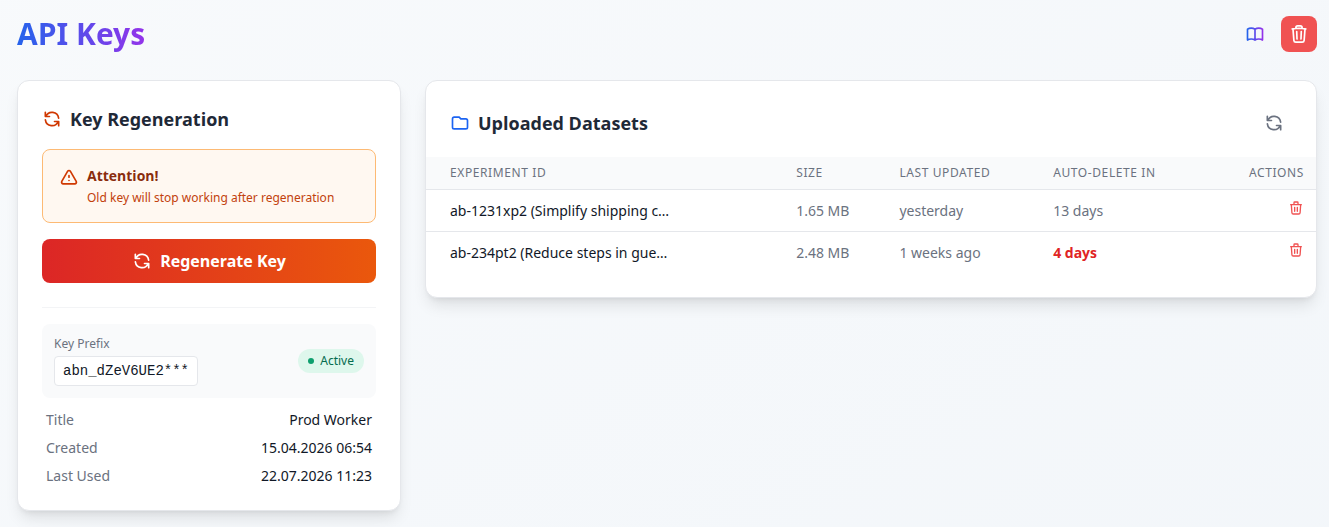
The API settings page shows your active key alongside every dataset currently stored in AB-Labz — with file size, last update time, and days until auto-deletion.
Schedule pushes from your side
The API itself is stateless — it just accepts a file. How often you push is entirely up to you. Set up a cron job or a pipeline trigger on your product's side, and AB-Labz will always have fresh data without anyone doing it manually.
- Daily push — analysts open the workbench, data is already there
- Hourly push during a running experiment
- Event-triggered push from your pipeline
Python
cURL
Live monitoring on the dashboard
Experiments delivered via API appear on the dashboard with real-time monitoring — updated automatically with every push you send.
- SRM check — traffic split correctness verified on every push
- Sample accumulation — see how far you are from the target sample size
- Win probability forecast — Bayesian estimate updated with each new dataset
One data mart — all experiments
The recommended pattern: build a single wide mart in your own infrastructure, then automate the slice-and-push step. AB-Labz receives clean per-experiment CSV files on a schedule — no manual work.
One wide table in your DWH — all experiments, all metrics, all segments, updated daily.
A nightly job queries the mart for each active experiment and exports the full dataset from day one to today.
Each push overwrites the previous file. AB-Labz always has the full up-to-date dataset — SRM, sample size, and forecast refresh automatically.
All experiments share the same metric definitions — conversions, revenue, segments calculated once, consistently.
New experiment_id in the mart → next run pushes it. Just add the ID to the hypothesis card in AB-Labz.
Store orders and revenue, not aov. The engine aggregates ratios correctly.
Available on Corporate plans
Start on Solo, upgrade to Corporate when you're ready to connect the API.